Forum Discussion

NeoGen
Jan 27, 2023Copper Contributor
Identify values and then display the content of the cell.
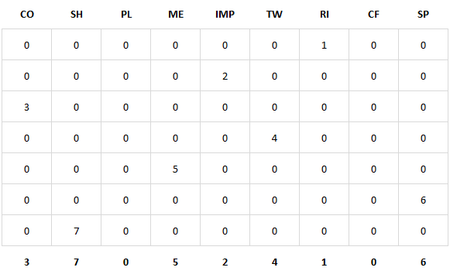
I am trying to set up a questionnaire that self populates the results. I have the answers given to 9 questions of 7 sections in a table (table is 9x7) Seen below: Each column is then summed, a...
- Jan 27, 2023
If your data including the headings are in cells B1:J8. The totals in row 9 then this function should work. See also the attached example file.
=INDEX(SORTBY(B1:J1,B9:J9,-1),SEQUENCE(3,3))A little more modern with the new WRAPROWS() function:
=WRAPROWS(SORTBY(B1:J1,B9:J9,-1),3)

NeoGen
Jan 31, 2023Copper Contributor
Thank you dscheikey,
Is it possible to do the same with either cells F16:H18 or B16:D18 which are the cells I would like blank if all the cells in B2:J8 are zero?
Many thanks in advance
Nick
Is it possible to do the same with either cells F16:H18 or B16:D18 which are the cells I would like blank if all the cells in B2:J8 are zero?
Many thanks in advance
Nick

dscheikey
Jan 31, 2023Bronze Contributor
J16 is the alternative to B16 and N16 is the alternative to F16.
I just left the old calculations and created the alternatives with IFERROR() next to them. I thought you would recognise that.