Forum Discussion

turan_aghayev
Mar 01, 2023Tin Contributor
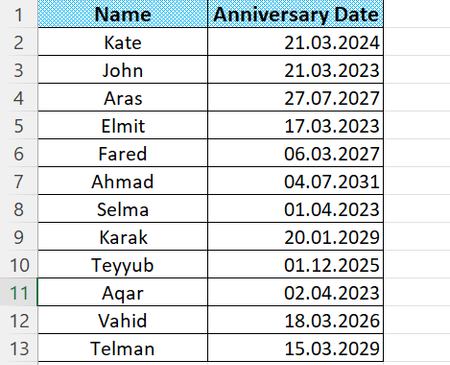
I want to give a conditional formatting to the "anniversary date" column
I want to give conditional formatting to the "Anniversary Date" column which the cell should be colored less than 45 days before that date
- Mar 01, 2023
Select the anniversary dates.
On the Home tab of the ribbon, click Conditional Formatting > New Rule...
Select 'Format on;y cells that contain'.
Leave the first drop down set to 'Cell Value'.
Select 'less than' from the second drop down.
Enter =TODAY()+45 in the box next to it.
Click Format...
Activate the Fill tab.
Select a color.
Click OK, then click OK again.

HansVogelaar
Mar 01, 2023MVP
Select the anniversary dates.
On the Home tab of the ribbon, click Conditional Formatting > New Rule...
Select 'Format on;y cells that contain'.
Leave the first drop down set to 'Cell Value'.
Select 'less than' from the second drop down.
Enter =TODAY()+45 in the box next to it.
Click Format...
Activate the Fill tab.
Select a color.
Click OK, then click OK again.