Forum Discussion

I am trying to create a formula to calculate home and away games using two criteria.
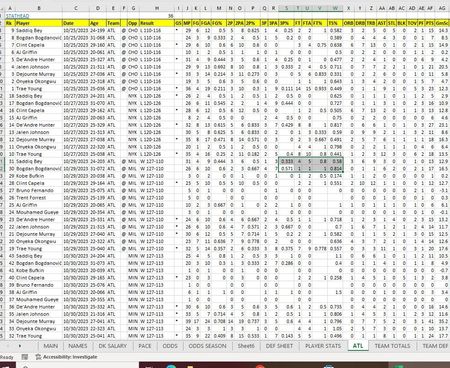
 Jan 14, 2024
Away games:
=COUNT(UNIQUE(FILTER(C3:C26,F3:F26="@")))
Home games:
=COUNT(UNIQUE(FILTER(C3:C26,F3:F26="")))
If you have access to FILTER and UNIQUE you can apply these formulas.

If I understand correctly, you want to count the number of away games based on two criteria: matching dates in Column C and the condition that Home is empty and Away is not empty in Column F.
You can use the COUNTIFS function in Excel to achieve this. Assuming your data starts from row 3, you can use the following formula:
=COUNTIFS($C$3:$C$500, C3, $F$3:$F$500, "Away", $G$3:$G$500, "")
This formula counts the number of rows where:
- Column C (dates) matches the date in the current row (C3 in this case),
- Column F (Home/Away) is "Away", and
- Column G (assuming it's where the team name is) is empty.
You can adjust the cell references based on the actual location of your data. Copy this formula to the cells where you want the count to appear.
Make sure to adjust the column references according to your actual data structure. AI was partially deployed to support the text.
My answers are voluntary and without guarantee!
Hope I was able to help you with this information.
Was the answer useful? Mark as best response and Like it!
This will help all forum participants.
- Hendew44Jan 14, 2024Copper ContributorFor example: Rows 3:33 in Column C & F Should return a result of 1 Home Game (C12:C20)=10/27/23 = 1 game F12:f:20)="" 1 Home game C3:C11)=10/25/23 1 game (F3:F11)=@ or 1 Away game. So After C20-F20 I would have 1 Home Game and 1 Away game.
- Hendew44Jan 14, 2024Copper ContributorHi Niko, thank you for your help. I did try that earlier. I don't know if you can see my snip it screen attachment to show what I mean. Column G is the opponent. In column F, an Away game is a symbol of @ and in column C the dates are in chronological order Ascending from oldest to newest. No matter how I slice it countifs won't work because it doesn't consider dates after c3 as unique for some reason. I hope that explains it better.