Forum Discussion

I am losing my mind, please help...
- Jan 19, 2023
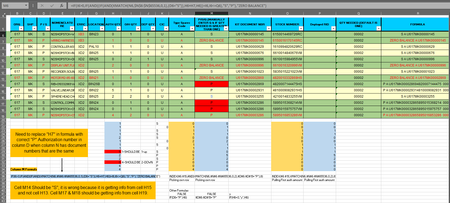
I want to thank you for trying very hard to explain your issue, but unfortunately I think I am still lost as to what you really need. My best guess is that if there is a "S" in col D you need the value from the corresponding line that has the "P". Assuming any line with an "S" will have a corresponding line with a "P" then a simple answer might be:
XLOOKUP("P"& [@[KIT DOCUMENT NBR]], [P / S] & [KIT DOCUMENT NBR], [AUTH QTY], 0)if that isn't actually formatted as a table then I recommend you DO format it as a Table and use table references like above instead of referencing whole columns of data. But if you insist on not formatting as a table then:
XLOOKUP("P"& N6, D:D & N:N, H:H, 0)

I want to thank you for trying very hard to explain your issue, but unfortunately I think I am still lost as to what you really need. My best guess is that if there is a "S" in col D you need the value from the corresponding line that has the "P". Assuming any line with an "S" will have a corresponding line with a "P" then a simple answer might be:
XLOOKUP("P"& [@[KIT DOCUMENT NBR]], [P / S] & [KIT DOCUMENT NBR], [AUTH QTY], 0)if that isn't actually formatted as a table then I recommend you DO format it as a Table and use table references like above instead of referencing whole columns of data. But if you insist on not formatting as a table then:
XLOOKUP("P"& N6, D:D & N:N, H:H, 0)