Forum Discussion

HYPERLINK function returns "Cannot open specified file"
 Nov 14, 2018
=HYPERLINK("#$A$3","Somewhere in the same worksheet")or
=HYPERLINK("#'ANOTHER SHEET'!$A$3","Somewhere in another worksheet")if you want a dynamic link in cell A3, put
#A5
then, the hyperlink function
=HYPERLINK($A$3, "Somewhere pointed by Cell A3")

Hi Damien,
my hyperlinks dont go to the corresponding sheet. all get errors.
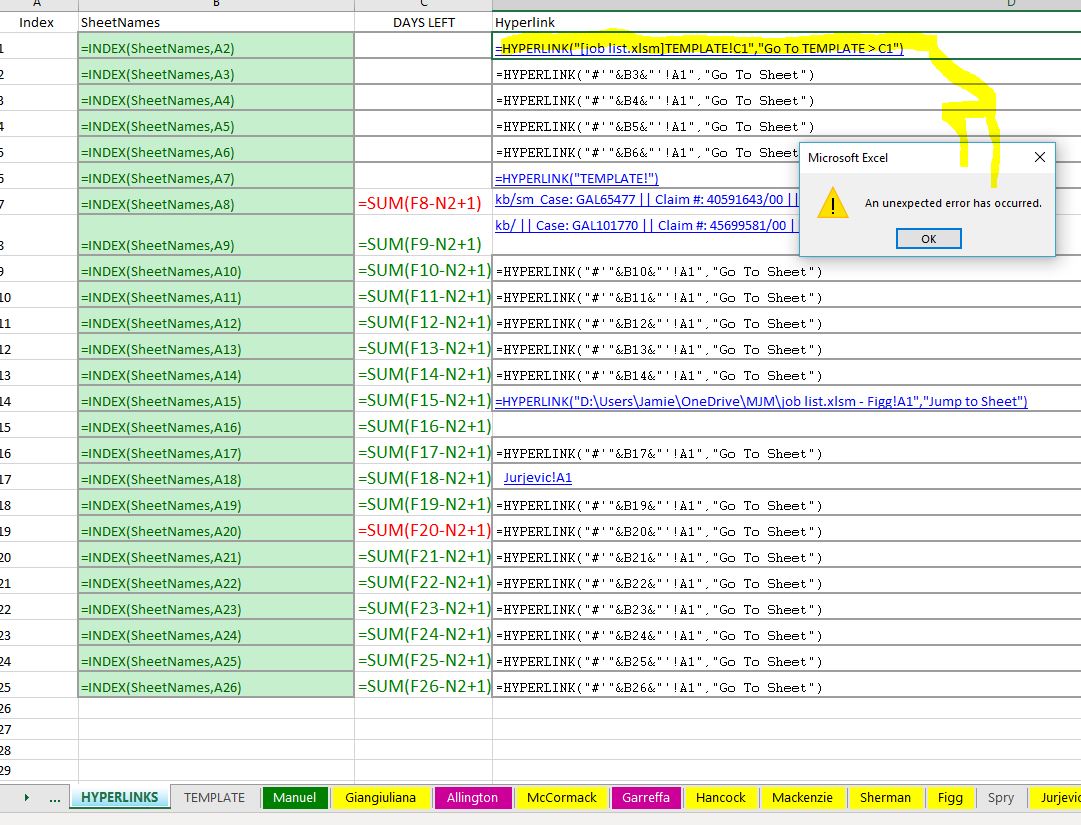
i have tried different hyperlink formulas. please see my screenshots.
for example, in my first screenshot, when i select the first (blue) link at the top of the screen, i get "an unexpected error has occurred.
i get the same response when i select the (black) link under it.
the thrid image show my spreadsheet in its whole.
can you see what is causing the errors?
thanks for your help.



Give this formula a try for linking within the same workbook:
=HYPERLINK("#TEMPLATE!C1","Go to TEMPLATE > C1")
In terms of using other cells to piece together a hyperlink (this example uses , copy and try:
=HYPERLINK("#"&"'" & B3 & "'!" & A1, "Go To Sheet")
See how you go?
Cheers
Damien
 SmallThings1991Apr 12, 2019Copper Contributor
Hi, This did solve my problem with the error messages I was getting but its not dynamic and moving when rows are added in. Please, can you help?
=HYPERLINK("#Sheet1!A20", "Fuel Systems")
- Willy LauJun 11, 2019Steel ContributorYou may try
=HYPERLINK("#Sheet1!" & ADDRESS(ROW(A20),COLUMN(A20)), "Fuel Systems")
- Jamie SutherlandJan 14, 2019Copper Contributor
Hey Damien,
thanks for getting back to me. curiously, both hyperlinks give me "an unexpected error has occurred". i'm starting to think there may be a bug in MS Excel.- Damien_RosarioJan 14, 2019Silver Contributor
Not sure what the issue is. Try simulating in a new Workbook to see if you still have the same issue?
Check your tab doesn't have any spaces in the name as well.
Otherwise, might need to log a support ticket with Microsoft?
Hope you figure it out! Let me know if any of the above works?
Cheers
Damien
- Jamie SutherlandJan 14, 2019Copper Contributor
actually, i can use your formulas on a new excel workbook, just not in my existing workbook. as you will see in the attached jpg each tab/sheet is a single name
