Forum Discussion

EdwinC100
Jun 30, 2022Copper Contributor
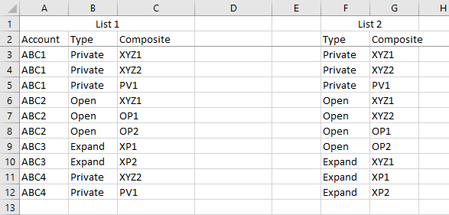
How to validate completeness of 1 list against another list
Hi, Refer to screenshot below. List 2 has for each "Type" there should be the corresponding "Composite"s. Is there a way to validate or point out in List 1 which "Accounts" are missing any "Compo...

EdwinC100
Jul 11, 2022Copper Contributor
That worked great! I'm trying to read interpret the vba to adjust it but honestly kinda lost. I tried to do a find and replace with "private" for "check" which would change the values in column F and B and I noticed that breaks the macro from picking up those with a "check" value. What part of the code do i edit to make it able to edit the types in column F and B? thank you!
OliverScheurich
Jul 11, 2022Gold Contributor
Sub accounts()

Dim j As Integer
Dim i As Integer
Dim k As Integer

Range("J:L").Clear

k = 2
j = Range("A" & Rows.Count).End(xlUp).Row

For i = 2 To j

If Cells(i, 2).Value = "private" Then
Cells(i, 2).Value = "check"
Range(Cells(2, 6), Cells(4, 6)).Value = "check"
Else
End If

Next i

For i = 2 To j

Select Case Cells(i, 2)

Case Is = "expand"
Range(Cells(k, 10), Cells(k + 2, 10)).Value = Cells(i, 1).Value
Range(Cells(k, 11), Cells(k + 2, 11)).Value = Cells(i, 2).Value
Range(Cells(k, 12), Cells(k + 2, 12)).Value = Range(Cells(9, 7), Cells(11, 7)).Value

Case Is = "open"
Range(Cells(k, 10), Cells(k + 3, 10)).Value = Cells(i, 1).Value
Range(Cells(k, 11), Cells(k + 3, 11)).Value = Cells(i, 2).Value
Range(Cells(k, 12), Cells(k + 3, 12)).Value = Range(Cells(5, 7), Cells(8, 7)).Value

Case Is = "check"
Range(Cells(k, 10), Cells(k + 2, 10)).Value = Cells(i, 1).Value
Range(Cells(k, 11), Cells(k + 2, 11)).Value = Cells(i, 2).Value
Range(Cells(k, 12), Cells(k + 2, 12)).Value = Range(Cells(2, 7), Cells(4, 7)).Value

End Select

k = Range("J" & Rows.Count).End(xlUp).Row + 1

Next i


End Sub
A possible solution could be this code with an additional FOR NEXT loop with IF THEN ELSE. These are lines 12 - 20 of the code.
If you want to replace "private" by "check" then enter "private" in row 14 and "check" in rows 15, 16 and 36.