Forum Discussion

How to subtract from the same user
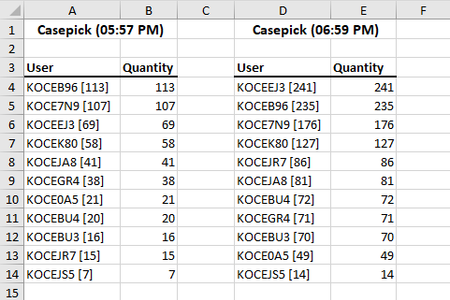

It very depends on which Excel version/platform you are. As variant
=MID( D4,FIND("[", D4)+1, LEN(D4) - FIND("[", D4)-1  ) -
  SUMPRODUCT( ( LEFT( $A$4:$A$6, FIND(" ", $A$4:$A$6) ) = LEFT(D4, FIND(" ",D4) ) ) *
              ( MID( $A$4:$A$6,FIND("[", $A$4:$A$6)+1, LEN( $A$4:$A$6) - FIND("[", $A$4:$A$6)-1  ) ) )
but on Excel 365 it could be done much easier.
- PeterBartholomew1Jul 30, 2022Silver Contributor
Note: This solution is limited by the requirement that each user ID should occur the same number of times in each table and it requires a very up-to-date version of 365.
WorksheetFormula
= LET(
  stacked,   VSTACK(table1,table2),
  sortedVal, DROP(SORT(stacked),,1),
  paired,    WRAPROWS(sortedVal,2),
  BYROW(paired, Diffλ));

Diffλ
= LAMBDA(pair, SUM({-1,1}*pair));
It first stacks the two tables;
then it sorts on User ID but only retains the associated values as a single column;
next it then uses WRAPROWS to create the two columns of corresponding values;
finally it differences the two columns using a Lambda function.
In this instance I returned the IDs with a distinct formula
= SORT(TEXTBEFORE(TAKE(table1,,1), "["))Sorry Sergei, this wasn't specifically addressed to you. I simply used your workbook as the starting point
- mathetesJul 30, 2022Gold Contributor
PeterBartholomew1 SergeiBaklan sivakumarrj CaitlynEXCEL
One of Excel's most redeeming features: there are so often multiple ways, different methods, to get from A to B. This thread illustrates that great truth!

