Forum Discussion

MMEXCEL1
Jul 09, 2024Copper Contributor
How to skip to next cell value if current cell doesn't match the criteria in the formula
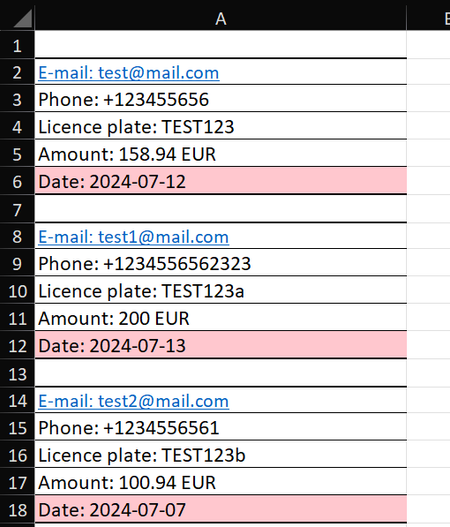
Hi, I have a following problem: In Sheet1 employees copy/paste some data about customers. They always have same 5 rows and are always copies in column A (see photo below): There ca...
- Jul 09, 2024


djclements
Jul 09, 2024Silver Contributor
MMEXCEL1 Since you've tagged Office 365, and the number of rows per record is consistent (5), you could also try using WRAPROWS with TEXTAFTER and TOCOL to spill the results for the entire range with a single formula:
=WRAPROWS(TEXTAFTER(TOCOL(A:A, 1), ": "), 5)
TOCOL removes the blank rows by setting the optional [ignore] argument to 1.
Sample Results