Forum Discussion

Cassandra_M_H
Apr 05, 2022Copper Contributor
How To Shade A Cell Based On Another Cell text
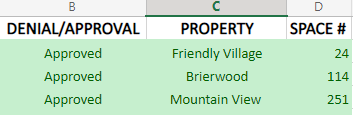
Hello, I would appreciate it if anyone can help me. I'm using the latest Excel worksheet and I'm trying to have multiple columns change shade based on the text on the first column. I'm trying to ...

HansVogelaar
Apr 05, 2022MVP
Select the range that you want to format. I will assume that it starts in row 2, and that the active cell in the selection is in row 2.
On the Home tab of the ribbon, select Conditional Formatting > New Rule...
Select 'Use a formula to determine which cells to format'.
Enter the formula
=$A2="Denied"
Click Format...
Activate the Fill tab.
Select red.
Click OK, then click OK again.
Repeat these steps with the formula =$A2="Approved" and green as color.
Finally, repeat them with =$A2="WIP" and yellow.

Cassandra_M_H
Apr 05, 2022Copper Contributor
Thank you so much you are a life saver. Other formulas I've tried just weren't working.