Forum Discussion

How to set min max bounds for Custom Values
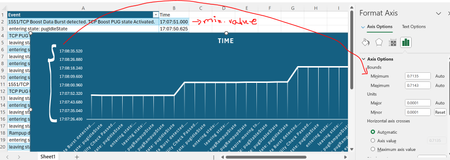

Thanks HansVogelaar , and strange I uploaded the one with 19kb.. let's see this time.

Double-click the y-axis.
In the Format Axis task pane, in the Axis Options tab, expand Number,
Click in the Format Code box and enter h:mm:ss.000, then click Add.
The y-axis will now use this format:
If you want to set the minimum or maximum, calculate the corresponding number:
- Enter a time value in a cell.
- Change the number format to General.
- Copy the value in the Formula bar.
- Paste it into the Minimum or Maximum box for the y-axis scale.
- anupambit1797Oct 25, 2024Steel Contributor
Thanks HansVogelaar , I tried the same, but, as you see the interval 17:07:50.625 (row num: 3, entering state: pugIdleState) is then not shown below need to increase the granularity in Y-axis also ,
Br,
Anupam
- HansVogelaarOct 25, 2024MVP
How about this?
- anupambit1797Oct 25, 2024Steel Contributor
Thanks,HansVogelaar , let me share mode detail about the data, which may help achieve this..
So, I need to study say a cycle between 2 TCP Burst marked in Green below row-2 and row-11,
While in the file you shared between both these it's a Flat line, I understand that within "
17:07:50.625 -> 4 Events took place, they can have a flat line, but after that it should be ramp up entring state/leaving state which happening at quite different intervals..
Br,
Anupam