Forum Discussion

zau73
Jul 14, 2024Copper Contributor
How to re arrange data in excel?
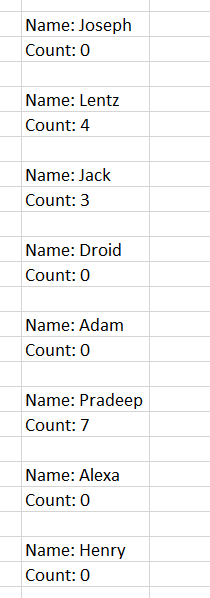
Hi, Currently i have my parameters all in the same column. But i need to arrange them in rows and column. For example: I want to have the Name and Count as column, that means i only want to 2 ...
- Jul 14, 2024
zau73 You can use WRAPROWS() function
=DROP(WRAPROWS(A1:A14,3,0),,-1)If you want to clean Name: and Count: strings then use SUBSTITUTE() function.
=SUBSTITUTE(DROP(WRAPROWS(A1:A14,3,0),,-1),{"Name: ","Count: "},"")


OliverScheurich
Jul 14, 2024Gold Contributor
An alternative could be Power Query. In the attached file you can add data to the blue dynamic table. Then you can click in any cell of a green table and right-click with the mouse and select refresh to update the green result table.
The data layout in the attached file is for illustration. You can as well place the green result tables in another worksheet.