Forum Discussion

ancasa
Jan 28, 2025Copper Contributor
How to lookup a value and and multiple columns and conditions
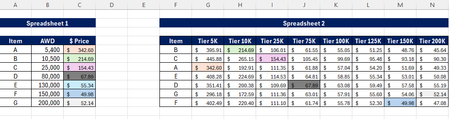
Hi! I have the following problem: In one hand, Spreadsheet 1 has in column A, an Item with its respective average weekly demand (AWD) and in column C i need the price according to that AWD. In...
- Jan 29, 2025
We can use multiple formulas. Here are a few. You may download the attached file.
=XLOOKUP(B6,{5,10,25,75,100,125,150,200}*1000,XLOOKUP(A6,$G$6:$G$12,$H$6:$O$12),0,-1)But I would suggest dynamic spill array formula using MAP().
=MAP(A6:A12,B6:B12,LAMBDA(x,y,XLOOKUP(y,{5,10,25,75,100,125,150,200}*1000,XLOOKUP(x,G6:G12,H6:O12),0,-1)))Using REGEXEXTRACT().
=XLOOKUP(B6,REGEXEXTRACT($H$5:$O$5,"[0-9]+")*1000,XLOOKUP(A6,$G$6:$G$12,$H$6:$O$12),0,-1)


Patrick2788
Jan 29, 2025Silver Contributor
This solution takes the data as you've arranged it and with the help of REGEXEXTRACT, converts the text headers to numbers. From there, it's a standard INDEX-XMATCH:
My formula uses named items.
=LET(
    scale, REGEXEXTRACT(tier, "\d+") * 1000,
    i, XMATCH(my_items, item),
    j, XMATCH(AWD, scale, -1),
    INDEX(amount, i, j)
)
 ancasaJan 29, 2025Copper Contributor
Hi Patrick,
I'm having issues replicating the formula. Is there a possibility we can have a quick Meet meeting?
I'd appreciate!! Thank you!!