Forum Discussion

meldons06
Jul 05, 2020Copper Contributor
How to know if a cell contains a value from the given list
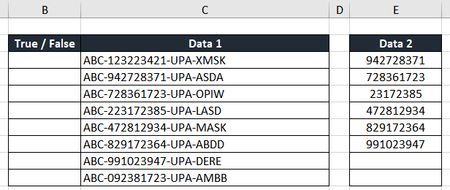
Hello, I would like to get a true or false value on column B if column C contains any value on the list of column E. Can someone help me with the formula. This has been my frustrati...

TheAntony
Jul 05, 2020Iron Contributor
meldons06 , For Outcome1, I used conditional formatting to get the green highlights using this formula:
=SUM(ISNUMBER(SEARCH(MID(F4,SEARCH("-",F4)+1,SEARCH("-",F4,SEARCH("-",F4)+1)-SEARCH("-",F4)-1),$G$4:$G$34))*1)=1
For Outcome 2, it's the same formula but with referencing J and K instead of F and G:
=SUM(ISNUMBER(SEARCH(MID(J4,SEARCH("-",J4)+1,SEARCH("-",J4,SEARCH("-",J4)+1)-SEARCH("-",J4)-1),$K$4:$K$34))*1)=1
Let me know if this works.

meldons06
Jul 05, 2020Copper Contributor
Hi TheAntony I truly appreciate your help. However, the formula you gave only applies to the sample file I did but not to the file i'm working on (after adjusting formula cells accordingly)
Here's a replica of what i am working on. The values on data 2 may be found anywhere in the text on column B (may be on the first, mid, or last)
Sorry if it's too complicated, thanks in advance!
- SergeiBaklanJul 06, 2020Diamond Contributor
- meldons06Jul 06, 2020Copper Contributor
Much appreciated, Thank you for all the help guys. TheAntony SergeiBaklan
- SergeiBaklanJul 07, 2020Diamond Contributor
meldons06 , you are welcome
