Forum Discussion

Miave
Jan 29, 2026Copper Contributor
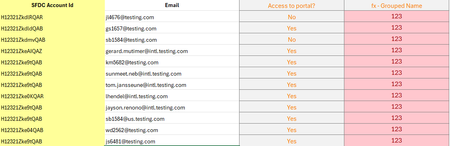
How to include all matching values in different rows using xlookup
Hi all, Need some help please. I am using "grouped name" as lookup value from another excel to get the email from this table. However xlookup only returns the first occurrence. How can I modify th...

IlirU
Jan 31, 2026Iron Contributor
Hi Miave,
(if I understood you correctly)
Use this formula:
=FILTER(B2:B13, D2:D13 = 123)If you want the result to be on a single row, use this formula:
=ARRAYTOTEXT(FILTER(B2:B13, D2:D13 = 123))In this case, email addresses are separated by commas.
Change the 123 in the formula if necessary.
(the data in cells D2:D13 is given as numbers)
If you are looking for something else, then explain your problem better and provide some details so we can understand how you want to receive this data.
Hope this helps.
IlirU