Forum Discussion

Miave
Jan 29, 2026Copper Contributor
How to include all matching values in different rows using xlookup
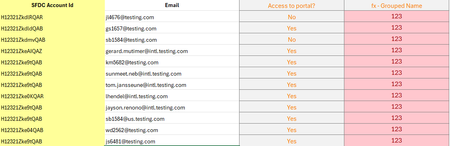
Hi all, Need some help please. I am using "grouped name" as lookup value from another excel to get the email from this table. However xlookup only returns the first occurrence. How can I modify th...

Lorenzo
Jan 30, 2026Silver Contributor
Hi Miave
I am using "grouped name" as lookup value... so that =xlookup("123", "fx-Grouped Name", "Email") would pull all the emails not just the first one
#1 Couple of points re. formula =XLOOKUP("123", "fx-Grouped Name", "Email"):
- The lookup_value is 123, not fx-Grouped Name
- fx-Grouped Name is the lookup_array
- Email is the return_array
#2 XLOOKUP, like any other matching function (ex. XMATCH, MATCH, VLOOKUP...), always returns the 1st matching "item" - if one exists - only. So what you expect to achieve can't be achieved with XLOOKUP. The FILTER function is probably what you're after but see next point
#3 Given that you expect >= 1 Email address(es) to be returned by your search/match formula, how do you want them to be "grouped" when there's > 1 match? Something like: 'EmailAddress1, EmailAddress44...'?