Forum Discussion

How to dynamically total/count across multiple columns of a dynamic array
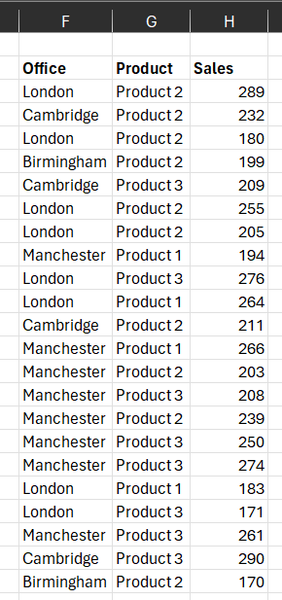

I completely accept that the Pivot Table will give the same result. One has a choice.
It is also faster to achieve the result provided:-
1. The developer has spent time to understand pivot tables
2. They have not already developed the worksheet formula and saved it as a Lambda function.
But then the same could be said for VBA or Python (give or take a few Command buttons, Refresh or menu picks). I suspect that to have fluency in each of these areas such as you do is rare. At present, I stick to the worksheet formula environment until the case to shift technologies is overwhelming.

I mentioned PivotTable only as comment to remind other options exist. For such case it doesn't require DAX and advanced data modelling skills. Refresh is a minus, more dynamic formatting is a plus.
Power Query here as easy as PivotTable, just two steps - query the source and GroupBy office/product. But it less common than PivotTable and also requires Refresh.
- PeterBartholomew1Oct 07, 2023Silver ContributorSpoilt for choice!!!
 DazExcelOct 07, 2023Copper ContributorYes indeed many options!
I’m really using this as an excuse to get better with dynamic arrays so if I can learn to build this as a one formula table, that would be great.
I’d rather avoid pivot tables as I find them inflexible if you’re trying to use the output for another process.
The output for this will eventually populate a csv for a journal import.
Great responses - I’ll spend some time digesting and learning some of the functions I haven’t used yet.- SergeiBaklanOct 08, 2023Diamond Contributor
IMHO, spill, PivotTable in tabular form and structured table returned by Power Query will give exactly the same csv output. From that point of view no difference.