Forum Discussion

How to dynamically total/count across multiple columns of a dynamic array
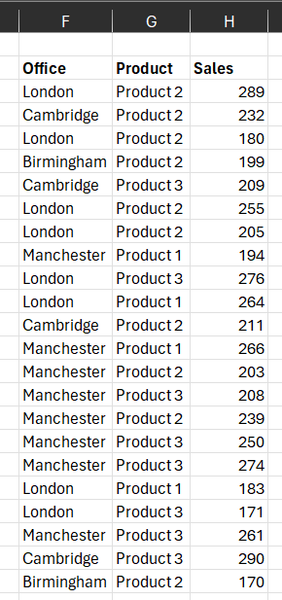


I completely accept that the Pivot Table will give the same result. One has a choice.
It is also faster to achieve the result provided:-
1. The developer has spent time to understand pivot tables
2. They have not already developed the worksheet formula and saved it as a Lambda function.
But then the same could be said for VBA or Python (give or take a few Command buttons, Refresh or menu picks). I suspect that to have fluency in each of these areas such as you do is rare. At present, I stick to the worksheet formula environment until the case to shift technologies is overwhelming.
- SergeiBaklanOct 07, 2023Diamond Contributor
I mentioned PivotTable only as comment to remind other options exist. For such case it doesn't require DAX and advanced data modelling skills. Refresh is a minus, more dynamic formatting is a plus.
Power Query here as easy as PivotTable, just two steps - query the source and GroupBy office/product. But it less common than PivotTable and also requires Refresh.
- PeterBartholomew1Oct 07, 2023Silver ContributorSpoilt for choice!!!
 DazExcelOct 07, 2023Copper ContributorYes indeed many options!
I’m really using this as an excuse to get better with dynamic arrays so if I can learn to build this as a one formula table, that would be great.
I’d rather avoid pivot tables as I find them inflexible if you’re trying to use the output for another process.
The output for this will eventually populate a csv for a journal import.
Great responses - I’ll spend some time digesting and learning some of the functions I haven’t used yet.