Forum Discussion

How to duplicate column based on date?
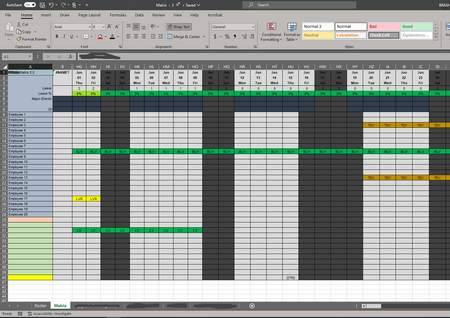

That file is not one I'd want to work with. I've written a formula that does the first thing you requested.
=INDEX($C$9:$AAZ$40,ROW()-8,MATCH($B$1,$C$1:$AAZ$1))It works, but I'm not happy with it, largely because I'm not comfortable with the layout--the design--of the worksheet, to begin with.
Part of that discomfort with the design is that I'm unfamiliar with the whole situation, what lies behind this. But more fundamentally,
- It seems to me that you're mixing data collection (input) with the output or reporting side of things, by asking that column B pull data from whatever column equals today's date; and you're doing that all on one sheet (Matrix).
- You're also arraying days sequentially on the horizontal plane, which means you'll run out of room long before you would if you turned that 90 degrees: Excel accommodates a lot more rows than it does columns. So I'm not sure what the history is here, why you chose to do it that way; perhaps replicating a process that has worked on paper (I've seen that happen many times).
I wasn't fully able to follow your second request, but perhaps you can adapt what I did for this first to your need. It may be that your "Roster" sheet is the separate output sheet I'd want to see....

Thank you for the input.
1. My original plan was to have everything on Matrix pull to the B column, so today is always visible despite wherever you are looking calendar and forecasting wise. Then I would just have that B column duplicated over on roster. However, when I made the original post, I did not sufficiently state that
.
2. We do the days horizontally as we generally only need about a year or two, then erase everything and start again. Its far easier for people to scroll left and right, especially with hiding columns on old dates until its time to delete everything.
As for the code itself, thank you. It worked wonders. I did change it to:
=INDEX($C$4:$AAZ$40,ROW()-3,MATCH($B$1,$C$1:$AAZ$1))
This allows it to cover the Rows 4-8. I am not sure what the ROW()-3 does, but it took me a while to figure out that adjustment.
Secondly, I am able to just have the code in Roster =Matrix!B(whatever number) which fills in the column for the day. I see in the code provided, it uses:
MATCH($B$1,$C$1:$AAZ$1)
Is there any possible way to use that code on the first page and have it reference Matrix! to fill in the array and range? B1 on Roster is the date block, so the $B$1 can stay, but after that is it possible to do something like MATCH($B$1,MATRIX!$C$1:$AAZ$1) or to that effect?
- mathetesJul 18, 2023Gold Contributor
Is this, on the Roster page, what you mean?
As for what ROW() means, and the associated subtraction there, there may be a more elegant way to retrieve the information, but when one uses the INDEX function, as we're doing,
=INDEX($C$4:$AAZ$40,ROW()-3,MATCH($B$1,$C$1:$AAZ$1))you need a way to say "into this cell, where the formula is, put the information that you find
- in the large array that is named first, $C$4:$AAZ$40
- in this numbered row of that large array (in this case, we want the first row of $C$4:$AAZ$40)
- but the formula itself is in cell B4, in the fourth row of the Excel spreadsheet (ROW() gives the result 4)
- so we have to subtract 3 from the result of ROW() to get 1
- in the column from the range $C$1:$AAZ$1 where the date MATCHes the date in cell $B$1
INDEX and MATCH combine as a powerful technique to retrieve information from a two dimensional array such as you have. Often, maybe even normally, one uses MATCH twice within an INDEX function, once to specify the row, again to specify the column. In this case, the row could be determined by starting with the row in which the formula appeared. Here's a reference that you can use to develop a deeper understanding of the combination.