Forum Discussion

Anonymous
Jun 07, 2022how to do this partial match? Thanks in advance!
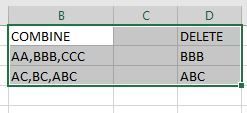
Hi, could anybody give me some insight of how to do partial match? my situation is as below: I have thousands row of column b, and column d is the things I will be deleting: instead of searching e...

OliverScheurich
Jun 07, 2022Gold Contributor
Deleted
Does the attached file return the results you are looking for?
Anonymous
Jun 07, 2022thank you! I think this is what I was asking for: but would you mind telling me what should I revise if I have like hundreds of row in column D?
my situation is I have thousand rows in column B, and hundred rows in column D, do I have to edit each rows of column E in your attached file?
or could I just maybe perform partial match in column E?
Thanks a million~
my situation is I have thousand rows in column B, and hundred rows in column D, do I have to edit each rows of column E in your attached file?
or could I just maybe perform partial match in column E?
Thanks a million~
- OliverScheurichJun 08, 2022Gold Contributor
Deleted
Sub combine_delete()

Dim i As Long
Dim j As Long
Dim k As Long
Dim mypos As Long
Dim rowsB As Long
Dim rowsD As Long

rowsB = Range("B" & Rows.Count).End(xlUp).Row
rowsD = Range("D" & Rows.Count).End(xlUp).Row

For i = 2 To rowsB

For k = 2 To rowsD

mypos = InStr(1, Cells(i, 2), Cells(k, 4))

If mypos > 0 Then

Cells(i, 7).Value = Replace(Replace(Cells(i, 2), Cells(k, 4), ""), ",,", ",")

If Left(Cells(i, 7), 1) = "," Then
Cells(i, 7).Value = Right(Cells(i, 7), Len(Cells(i, 7)) - 1)

Else

    If Right(Cells(i, 7), 1) = "," Then
    Cells(i, 7).Value = Left(Cells(i, 7), Len(Cells(i, 7)) - 1)

    Else
    End If

End If

Else
End If
Next k

Next i


End Sub
Maybe with this code. In the attached file you can click the button in cell E2 to start the macro. You can enter additional data in columns B and D.
- AnonymousJun 08, 2022thank you so much ! I just msg u~~
- OliverScheurichJun 08, 2022Gold Contributor
Deleted
You are welcome. I've just replied to your message.