Forum Discussion

woogiiboo
Feb 27, 2023Copper Contributor
How to divide text using text-to-column in this situation
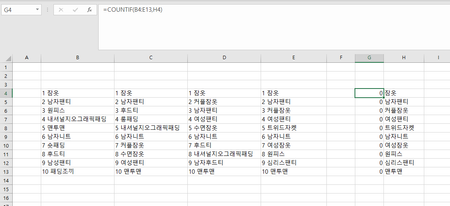
I'm trying to look up how many times a specific keyword (in column G) appears in the table (B5:E15) using the =Countif function, but and as you can guess, the keywords in the table have a numbe...
- Feb 27, 2023
If you want to keep the numbers, you could use
=COUNTIF(B4:E14, "*"&H4)
To get rid of the numbers, you could do the following:
In B16, enter the formula
=MID(B4, FIND(" ", B4)+1, 100)
Fill to the right to E16, then down to row 26.
Select B16:E26.
Copy this range, then paste as Values to B4.
You can then clear B16:E26, it is not needed anymore.

woogiiboo
Feb 27, 2023Copper Contributor
Wow, you are so clever! Thanks for your help! The first solution using the Counif function works perfectly. But, the other solution using the mid function returns an error value with "#VALUE!".

HansVogelaar
Feb 27, 2023MVP
Perhaps the character between the number and the text is not a space.
Does this work?
=MID(B4, FIND(CHAR(160), B4)+1, 100)