Forum Discussion

How to divide text using text-to-column in this situation
- Feb 27, 2023
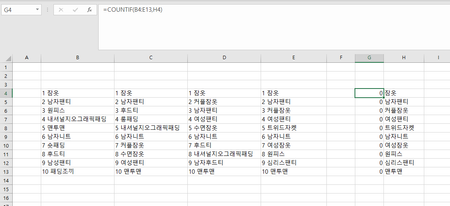
If you want to keep the numbers, you could use
=COUNTIF(B4:E14, "*"&H4)
To get rid of the numbers, you could do the following:
In B16, enter the formula
=MID(B4, FIND(" ", B4)+1, 100)
Fill to the right to E16, then down to row 26.
Select B16:E26.
Copy this range, then paste as Values to B4.
You can then clear B16:E26, it is not needed anymore.

If you want to keep the numbers, you could use
=COUNTIF(B4:E14, "*"&H4)
To get rid of the numbers, you could do the following:
In B16, enter the formula
=MID(B4, FIND(" ", B4)+1, 100)
Fill to the right to E16, then down to row 26.
Select B16:E26.
Copy this range, then paste as Values to B4.
You can then clear B16:E26, it is not needed anymore.

- HansVogelaarFeb 27, 2023MVP
Perhaps the character between the number and the text is not a space.
Does this work?
=MID(B4, FIND(CHAR(160), B4)+1, 100)