Forum Discussion

kharacol
Aug 06, 2024Copper Contributor
How to create a list of units to show only those moving in the next 90 days?
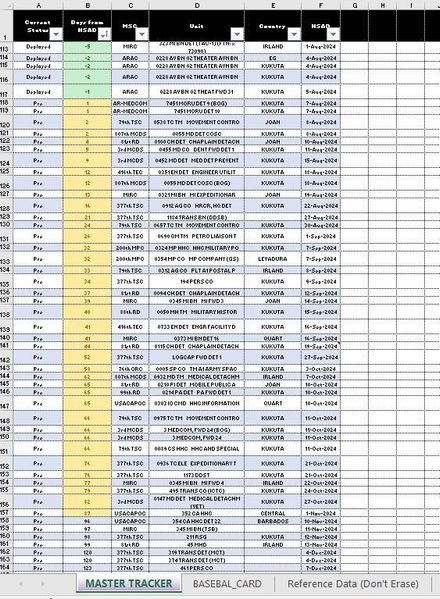
I have a huge Excel list (I called Master Tracker; see screenshot) of units scheduled to move on a given date. I am using Excel 365. The list will capture one year ago from today and one year in the ...

Rodrigo_
Aug 08, 2024Iron Contributor
kharacol
I did a small sample file based on the image you've provided. Assumed that your column B in master tracker sheet has a formula of '=Column F-Today()'
in baseball card sheet, I used filter function to return the selected arrays based on the dates that are projected for the next 90 days master tracker sheet. '>0, <=90'
=FILTER(
  CHOOSE({1,2,3},
    Table1[MSC],
    Table1[Unit],
    Table1[Country]
  ),
 (Table1[Days from HSAD]>0) * (Table1[Days from HSAD]<=90)
)
and inserted the 'total units' on the title of the table
="Forces Projected next 90 days
" & "Total Units: " & ROWS(FILTER(CHOOSE({1,2,3}, Table1[MSC], Table1[Unit], Table1[Country]), (Table1[Days from HSAD]>0) * (Table1[Days from HSAD]<=90)))
to convert/export the baseball card sheet to PowerPoint. you need to use a macro.
Sub ExportToPowerPoint()
    Dim pptA As Object
    Dim pptP As Object
    Dim pptS As Object
    Dim ws As Worksheet
    Dim rng As Range
    Dim lastCell As Range
    Dim img As Object

    Set ws = ThisWorkbook.Sheets("Baseball_Card")
    Set lastCell = ws.Cells.SpecialCells(xlCellTypeLastCell)
    Set rng = ws.Range("A1", lastCell)

    rng.CopyPicture Appearance:=xlScreen, Format:=xlPicture

    On Error Resume Next
    Set pptA = GetObject(class:="PowerPoint.Application")
    If pptA Is Nothing Then
        Set pptA = CreateObject(class:="PowerPoint.Application")
    End If
    On Error GoTo 0

    Set pptP = pptA.Presentations.Add
    Set pptS = pptP.Slides.Add(1, 11) ' 11 = ppLayoutTitleOnly
    pptS.Shapes.PasteSpecial(DataType:=2).Select ' 2 = ppPasteEnhancedMetafile
    Set img = pptA.ActiveWindow.Selection.ShapeRange

    With img
        .LockAspectRatio = msoFalse
        .Left = 0
        .Top = 0
        .Width = pptP.PageSetup.SlideWidth
        .Height = pptP.PageSetup.SlideHeight
    End With

    pptA.Visible = True

    Set pptS = Nothing
    Set pptP = Nothing
    Set pptA = Nothing
End Sub
the macro will find the last cell with value (bottom-right) in order to set a range to convert and copy the sheet content into an image and will paste it in PowerPoint.
sample file > @kharacol.xlsx