Forum Discussion

Jack_Roberts
Dec 09, 2021Copper Contributor
How to count periods of absence in excel
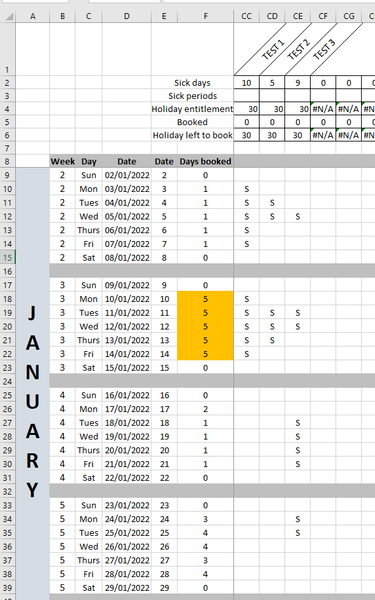
Hey, I am creating a spreadsheet to track holidays and absence. I need to figure out a way of counting periods of absence. For example, in the attachment I want TEST 1 to show as one period of absenc...
- Dec 10, 2021
What do you see when you open the sample workbook attached below?

HansVogelaar
Mar 03, 2023MVP
See the attached workbook. You can now optionally specify a workdays string.
The workdays string must be seven characters long and each character in the string represents a day of the week, starting with Monday. 1 represents a workday and 0 represents a non-workday.
For example, "0000011" means that only Saturday and Sunday are workdays.
If you omit the workdays string, "1111100" is assumed, i.e. workdays are Monday to Friday.

Dagmara912
Mar 03, 2023Copper Contributor
HansVogelaar this is genius, thank you. How can I make the formula not to be case sensitive?
- HansVogelaarMar 03, 2023MVP
Change the line
If coderange(i).Value = code Thento
If UCase(coderange(i).Value) = UCase(code) Then- Dagmara912Mar 03, 2023Copper ContributorThank you so much