Forum Discussion

How to Conditionally Format a date cell based on any date being entered in another cell (same row)
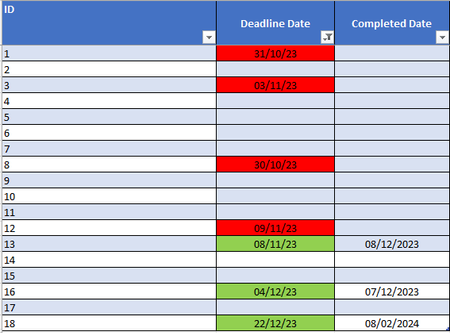
- Feb 13, 2024
Select the cells in the data range of the Deadline Date column, from B2 down.
B2 should be the active cell in the selection.
On the Home tab of the ribbon, click Conditional Formatting > New Rule...
Select 'Use a formula to determine which cells to format'.
Enter the formula=AND($B2<>"", $C2="")
Click Format...
Activate the Fill tab.
Select red as highlight color.
Click OK, then click OK again.Repeat these steps, but with the formula
=$C2<>""
and green as fill color.

Select the cells in the data range of the Deadline Date column, from B2 down.
B2 should be the active cell in the selection.
On the Home tab of the ribbon, click Conditional Formatting > New Rule...
Select 'Use a formula to determine which cells to format'.
Enter the formula
=AND($B2<>"", $C2="")
Click Format...
Activate the Fill tab.
Select red as highlight color.
Click OK, then click OK again.
Repeat these steps, but with the formula
=$C2<>""
and green as fill color.