Forum Discussion

How to build a perfect relationship in power pivot that can be used for power bi

Hi,
Many thanks for your prompt response!
Here I have attached my pbix file.https://1drv.ms/u/s!AhUFhM5jR1jqigmtH4z0VsT5kfBz?e=krF0ab
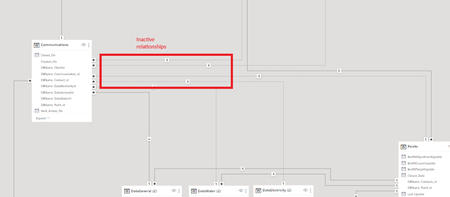
While I had created relationships, I faced inactive relationships between some tables.
Please let me know if you need further information.
Thanks in advance!

It all depends on your business logic. Let consider this group of relationships
You have active relationships from Point to Communications through Water. If you select Point it returns all Water Names and for these names related communications data. Same ways through Electricity and General are inactive, you can't keep active all three at once.
Keep latest two active you could make them as bidirectional relationships
which could affect performance. Such kind of relationships are not supported in Power Pivot, alternatively you may use in DAX measures USERELATIOSHIPS and/or CROSSFILTER.
Didn't check all, my guess it is practically the same with other your relationships.
File is under the same link as before, but I changed nothing except above in separate layout.
- Excellove15Sep 17, 2023Iron Contributor
Hi,
Apologies for the delay!
This is awesome and you made it look so easy!

I am happy that invoice tables(Electricity, General, water) all made into one table. Great!
But I need your help in bringing dimension tables(clients,contacts,points) to come into the modeling part so that model will look complete.
My business logic is as shown below:
Dimension tables(clients,contacts,points) have a relationship built in that is connected to communications to query that table.
We also need to filter the communications table using Client table directly, irrespective of default relationship between dimension tables(from client to contact, contact to point, point to invoice(electricity, general, water))In short:
Client should filter communications
contacts should filter communications
points should filter communications
batch should filter communications
also, client should filter contacts,contacts should filter points,points should filter communicationsPFA screen shots for the above descriptions:
Please advise me how we can remodel it to efficient create a report.
Please let me know if you need further details.
File is in the same location.
Thanks in advance!
- SergeiBaklanSep 15, 2023Diamond Contributor
It all depends on your business logic. As variant, I combined General, Electricity and Water in one table as
Data =
UNION (
    ADDCOLUMNS (
        'DataElectricity (2)',
        "Category", "Electricity",
        "Key", "E-" & [DBName-Id]
    ),
    ADDCOLUMNS (
        'DataGeneral (2)',
        "Category", "General",
        "Key", "G-" & [DBName-Id]
    ),
    ADDCOLUMNS ( 'DataWater (2)',
        "Category", "Water",
        "Key", "W-" & [DBName-Id] )
)
in Communications added the column Key as
Key =
IF (
    Communications[DBName-DataElectricityId] <> "",
    "E-" & Communications[DBName-DataElectricityId],
    IF (
        Communications[DBName-DataWaterId] <> "",
        "W-" & Communications[DBName-DataWaterId],
        IF (
            Communications[DBName-DataGeneralId] <> "",
            "G-" & Communications[DBName-DataGeneralId]
        )
    )
)
and one more table is Category as
Category = {"Electricity", "General", "Water" }With that relationships could be
See Layout 2 in the file Communications (3) at TechComm. Of course, if go such way it's better to make above tables at Power Query stage. And your measures shall be adjusted.
It looks like you have intersection of DBName-Id for different categories, perhaps if so you need more adjustments.
- Excellove15Sep 14, 2023Iron Contributor
Hi,
Apologise for the delay!
I have had a look into this and this is a great modeling technique you have given us!
Below is our raw data ss and this is how originally it looked like before we unpivoted them to separate columns for Data Electricity,Site,Batch,Client group:
Is it possible to merge DataElectricity, Data General and Data water table with communications table shown in below image?
If so, can you please guide me through how to do it?
PFA file https://1drv.ms/u/s!AhUFhM5jR1jqigtbA4SbFtKs9D22?e=f7kdKh
Please let me know if you need further info.
Thanks in advance!
- Excellove15Sep 09, 2023Iron Contributor
Hi,
Many thanks for your quick response!
Thats amazing to see the screen shots you have given me to explain this.
This gives me some idea and let me play around with it and get back.