Forum Discussion

How to build a perfect relationship in power pivot that can be used for power bi
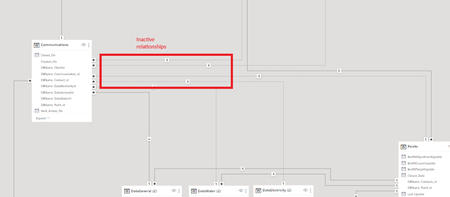

we need a way to be able to see a table of all queries together, we then need to be able to filter by client, batch, contact, point, invoice etc and consider all relevant queries.
a good example of this is if i select client i don't just want to see the queries that have been raised at a client level i want to see all queries for that client, so this will include, client, sites, points, batch, invoice.
likewise if i select a site i want to see queries for the site, any points in that site and any invoices / batches for that site. at the moment the ids are separate, we need the modelling to consider the relationships between these queries
Thanks in advance!

I loaded the file into Power BI Desktop and with some minor adjustment see no inactive relationships. To check how good they are it's necessary to understand logic of the data and which measures will be used. Not what I know.
To build similar relationships in Power Pivot shall be not a big job if know exact logic. Before that you need to massage source data by Power Query and load result for each table into the data model. Perhaps initially your sources are in some database, when you may work directly with it without loading data into the grid.
Here is the file.
- Excellove15Sep 08, 2023Iron Contributor
I couldn't open the file you had sent.Can you please attach it in below link if possible?
https://onedrive.live.com/?id=EA584763CE840515%21737&cid=EA584763CE840515
Also, if possible, please share the excel file in which you made minor adjustment.Thanks in advance.
- SergeiBaklanSep 08, 2023Diamond Contributor
- Excellove15Sep 08, 2023Iron Contributor
Hi,
Many thanks for your prompt response!
Here I have attached my pbix file.https://1drv.ms/u/s!AhUFhM5jR1jqigmtH4z0VsT5kfBz?e=krF0ab
While I had created relationships, I faced inactive relationships between some tables.
Please let me know if you need further information.
Thanks in advance!
- SergeiBaklanSep 08, 2023Diamond Contributor
Link requires authorization. You may create folder available for everyone, perhaps it works when.
Changes were made in Power BI Desktop when I import Excel file
- headers added to tables
- data type applied in some tables
- add Date column in activities since currently you use datetime
- change some of detected relationships from many-to-many on one-to-many
- added couple of obvious relationships which were not detected (as on Date)
- Excellove15Sep 08, 2023Iron ContributorHi Sergei Baklan,
Many thanks for your prompt response! Exactly what I wanted! I am doing this in order to create power bi dashboard. but I was confused with my data modeling in power bi that had inactive relationships. So I filtered the original data and exported data into excel and I wanted to get the help of community.
Although this is a raw sample file i have provided, let me check the file you have sent.
If everything goes well and I will close this query sir and apply the changes to my original file that contains millions of rows.
If you don't mind, can you please specify minor adjustments you made, as that will help me to understand the data better.
Let me have a look and get back!
Thanks in advance