Forum Discussion

Maggi685
Oct 03, 2023Copper Contributor
How to autmatically change the bar color for certain chart bar without manually change
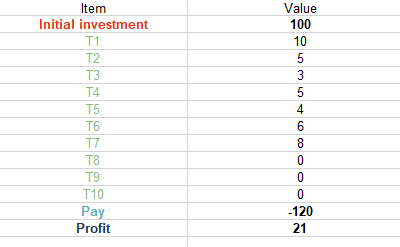
I need some help, I have already tried to figure it out by myself for many days, but still, it does not work. I have the below table (Image 1), and I want to make the bar charts (like waterfall chart...

mrjohnsmith
Oct 03, 2023Tin Contributor
To automatically change bar colors in a chart based on conditions, use conditional formatting in spreadsheet software like Excel or Google Sheets.
Select the data series and create a rule with a formula that triggers a color change when a condition is met (e.g., =A1=0 for values equal to 0). Set a specific color for bars meeting this condition. For bars not meeting the condition, define your desired default color (e.g., green).
Ensure the conditional formatting rule applies universally, including new data. This way, as you update your chart with different https://lunchtimeresults.com/, the bar colors will automatically adjust, maintaining consistency without manual changes.