Forum Discussion

CALOM1
Jan 01, 2021Copper Contributor
How to alternate table row colour based on the contents of a cell within the row
Hi, I am wanting to add in conditional formatting to my table so that the row colour alternates when the contents of one of the row's cells changes... E.g. How do I get the row colour ...
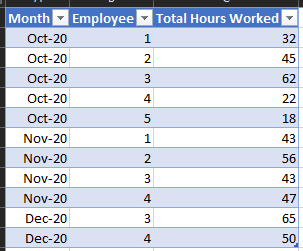
- Jan 01, 2021
Use the following formula in the conditional formatting rule:
=MOD(ROUND(SUM(1/COUNTIF($A$2:$A2,$A$2:$A2)),0),2)

CALOM1
Jan 01, 2021Copper Contributor
Thanks for your reply! This works great for dates but if I wanted the active bit to be data other than a date, such as text that changes...
So how would I get the row colour to change when the first cell of the row changes from London to Paris etc.?
Thanks!

HansVogelaar
Jan 01, 2021MVP
Use the following formula in the conditional formatting rule:
=MOD(ROUND(SUM(1/COUNTIF($A$2:$A2,$A$2:$A2)),0),2)
- CALOM1Jan 01, 2021Copper Contributor