Forum Discussion

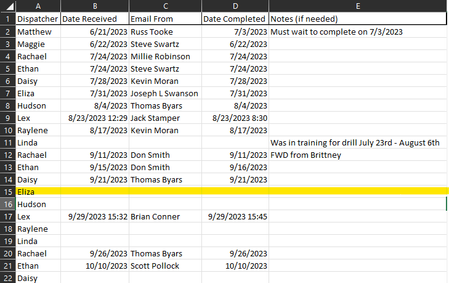
How do I identify the next personal who needs to do a task in excel?

=LET(result,SORTBY(A2:E18,SCAN(0,SEQUENCE(ROWS(A2:A18)),LAMBDA(ini,arr,IF(ISNUMBER(INDEX(D2:D18,arr))+ISTEXT(INDEX(E2:E18,arr)),ini+1,0)))),IF(result=0,"",result))
With Office 365 or Excel for the web you can try this formula which numbers the table in columns A - E depending on if there is a date in column D or a text in column E and then sorts the table in ascending order of the numbering. In column F you can see the result of the numbering. The result is the spilled range in columns H to L which dynamically updates according to the changes in the original table.

I just tried it but it came up with #NAME?
I noticed that you mentioned doing this on Office 365 or Excel for the web. I am working off of Excel 2016 on the desktop application. I don't know if that has anything to do with it not working? Is there a way to make this work on that version of Excel?
Thank you for your help!
- OliverScheurichOct 27, 2023Gold Contributor
Yes that's because e.g. LAMBDA isn't available in Excel 2016. Alternatively i'd create a helper column with this formula.
=ISNUMBER(D2)+ISTEXT(E2)Then i'd apply a custom sort by column F (helper column) in ascending order ("aufsteigend" in german in the screenshot).