Forum Discussion

Chastitycaprice
Apr 05, 2024Copper Contributor
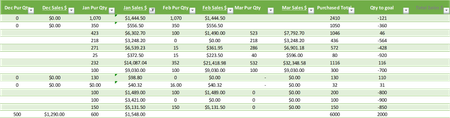
How do I get the Total Sales data to match the latest monthly sales data available in each row?
Hello everyone, I would like the last column below (Total Sales $) to match the latest monthly sales data for each row, ignoring the purchase qty column information (Example: Jan Pur Qty, Feb Pu...
- Apr 08, 2024
Use HSTACK:
=XLOOKUP(1, (HSTACK(N4, P4, R4, T4, V4) <> "") * (HSTACK(N4, P4, R4, T4, V4) <> 0), HSTACK(N4, P4, R4, T4, V4), , , -1)

rachel
Apr 05, 2024Steel Contributor
You can leverage the "Search from last to first" option of XLOOKUP to find the last non-empty cell:
https://exceljet.net/formulas/get-value-of-last-non-empty-cell
In your case ,you can use below formula:
=LET(
    sales_data, FILTER(
        A2:J15,
        ISNUMBER(FIND("Sales $", A1:J1, 1)),
        ""
    ),
    BYROW(
        sales_data,
        LAMBDA(row, XLOOKUP(TRUE, row <> "", row, "", 0, -1))
    )
)
See attached sheet.
Also, could you please paste sample data in a table format, instead of posting screenshot here?
I have to use below "Picture From File" to convert your screenshot into something I can work on. It involves lots of manual fiddling.