Forum Discussion

rodsan724
Oct 12, 2021Brass Contributor
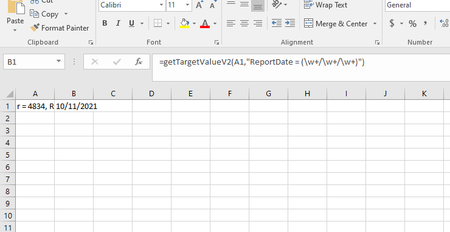
How do I get just the date using regex
I'm trying to use some regex (like here) to get just the date from following string r = 4834, ReportDate = 10/11/2021 12:00:00 AM, Data desired result: 10/11/2021 This seems to work: ...
- Oct 12, 2021
Or instead of using the pattern in the formula, place the following UDF on a Standard Module and then you can simply use the formula =getDate(A1) on the worksheet and then change the format of the formula cell to Date.
Function getDate(ByVal content As String) As Date
Dim Matches As Object
With CreateObject("VBScript.RegExp")
    .Global = True
    .ignorecase = True
    .pattern = "\d{2}/\d{2}/\d{4}"
    If .test(content) Then
        Set Matches = .Execute(content)
        getDate = Matches(0)
    End If
End With
End Function

Subodh_Tiwari_sktneer
Oct 12, 2021Silver Contributor
Or instead of using the pattern in the formula, place the following UDF on a Standard Module and then you can simply use the formula =getDate(A1) on the worksheet and then change the format of the formula cell to Date.
Function getDate(ByVal content As String) As Date
Dim Matches As Object
With CreateObject("VBScript.RegExp")
    .Global = True
    .ignorecase = True
    .pattern = "\d{2}/\d{2}/\d{4}"
    If .test(content) Then
        Set Matches = .Execute(content)
        getDate = Matches(0)
    End If
End With
End Function