Forum Discussion

Dawn_L
Feb 11, 2022Copper Contributor
How do I create an "if" statement with another formula
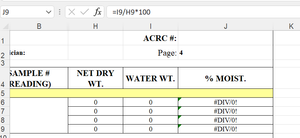
I am trying to create an "if" statement in the same column of another for example: =I9/H9 - if this is greater than 100, enter 100, if not enter the mathematical %
- Feb 11, 2022
If I understood it correctly... here is a quick solution.
=IF((I9/H9*100)>100,100,"%")
Hope I was able to help you with this info.
I know I don't know anything (Socrates)

NikolinoDE
Feb 11, 2022Platinum Contributor
If I understood it correctly... here is a quick solution.
=IF((I9/H9*100)>100,100,"%")
Hope I was able to help you with this info.
I know I don't know anything (Socrates)
 Dawn_LFeb 11, 2022Copper ContributorThank you. That is exactly what I was looking for. I appreciate your help.
- NikolinoDEFeb 11, 2022Platinum Contributoryw 🙂