Forum Discussion

littlevillage
Jul 18, 2022Iron Contributor
How can I filter a table with multiple criteria.
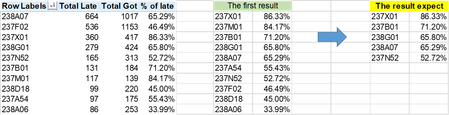
Hi, I am trying to filter a Pivot table. I have written a formula: =INDEX(SORT(FILTER(H4:K132,I4:I132>=LARGE(I4:I132,10),""),4,-1),SEQUENCE(10),1) I got the first result succesfully, but next ste...
- Jul 19, 2022
But it is not the expected result you show in the workbook.
=SORT(FILTER(FILTER(H4:K132,I4:I132>=LARGE(I4:I132,5),""),{1.0.0.1}),2,-1)

Detlef_Lewin
Jul 18, 2022Silver Contributor
And what rules should be applied to get from "The first result" to "The result expect"?

littlevillage
Jul 18, 2022Iron Contributor
Thank you for your response
Actually, I want to get the expected result directly from the pivot table, with the rule that the criteria in column K are sorted from highest to lowest combined with high values in column I. The expected result is 5 items with percentages from highest to lowest.
- Detlef_LewinJul 18, 2022Silver Contributor
So, you want the Top 5 based on field "Total Late" and sorted from highest to lowest based on field "% of late", correct?
- littlevillageJul 19, 2022Iron Contributor
yes, Lewin, that's correct. That's the result expect.
- Detlef_LewinJul 19, 2022Silver Contributor
But it is not the expected result you show in the workbook.
=SORT(FILTER(FILTER(H4:K132,I4:I132>=LARGE(I4:I132,5),""),{1.0.0.1}),2,-1)