Forum Discussion

How can I create a last modified macro for each worksheet?
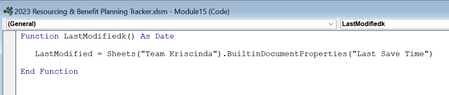

Document Properties only apply to the workbook as a whole, not to individual worksheets.
It would be possible to write VBA to register when the user last changed the value of any cell in a worksheet. Where would you like this information to be stored? In a cell on the worksheet itself, or on a summary sheet, or ...?

Ah ok, that sounds more of what I am looking for. Yes, I would like to show if a user has amended any cell in a worksheet. I want to store the information on a summary sheet.
Thanks,
Jamie
- HansVogelaarFeb 22, 2023MVP
See the attached sample workbook. The code is in the ThisWorkbook module (under Microsoft Excel Objects in the Project Explorer pane of the Visual Basic Editor).
You'll have to allow macros when you open it, obviously.
- jburrellFeb 23, 2023Copper Contributor
Thanks for sending that over. I am very new to VBA. Would I need to change where it says "Summary" to the sheet name where I want to display it? And how do I pull the data in for each sheet?
Thanks for your help!
- HansVogelaarFeb 23, 2023MVP
Yes. Change the name Summary in the following line to the name you want to use.
Set wsh = Worksheets("Summary")The code will run automatically whenever you change a cell on a worksheet.