Forum Discussion

Olejeek
Oct 30, 2021Copper Contributor
Highlight unique with a partial match
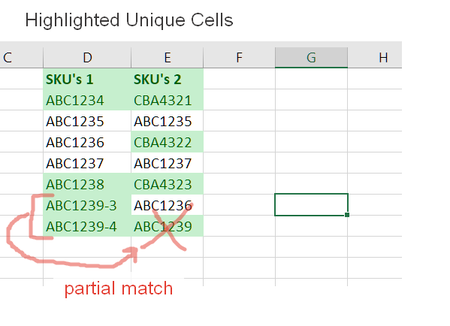
Hello, I need to find and highlight unique values, even those that match partially in two columns. I have attached a screenshot to show what I mean. Thank you in advance
- Nov 01, 2021
Update the previous formula with ISERROR() or TYPE() formula
=ISERROR((MATCH("*"&$B2&"*",$A$2:$A$8,0)))


Olejeek
Nov 01, 2021Copper Contributor
I'm so sorry. I didn't quite clearly explain what I needed. I need to highlight unique cells in SKU's 2 column that are not in SKU's 1 column (SKU's 2 should not have duplicates in SKU's 1). But even if the match is partial, it should not be tractaded (shouldn't be highlighted) as unique, for me ABC1239-3 or ABC1239-4 is the same product (SKU) as ABC1239. In other words, I need the opposite of a function that highlights the duplicate values with a partial match.
- Juliano-PetrukioNov 01, 2021Bronze Contributor
Update the previous formula with ISERROR() or TYPE() formula
=ISERROR((MATCH("*"&$B2&"*",$A$2:$A$8,0)))- OlejeekNov 02, 2021Copper Contributorseems like this is what I need, thank you!