Forum Discussion

Help With Vlookup/Index with lists
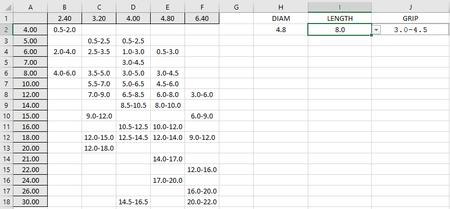
- Jul 25, 2022
Right-click the sheet tab and select 'View Code' from the context menu to view the code in the worksheet module:
Private Sub Worksheet_Change(ByVal Target As Range)
    Dim r As Long
    Dim c As Long
    Dim s As Long
    If Not Intersect(Range("H2"), Target) Is Nothing Then
        Application.ScreenUpdating = False
        Application.EnableEvents = False
        Range("I2,M2:M18").ClearContents
        s = 1
        If Range("H2").Value <> "" Then
            c = Application.Match(Range("H2").Value, Range("A1:F1"), 0)
            For r = 2 To 18
                If Cells(r, c).Value <> "" Then
                    s = s + 1
                    Cells(s, 13).Value = Cells(r, 1).Value
                End If
            Next r
        End If
        Application.EnableEvents = True
        Application.ScreenUpdating = True
    End If
End Sub
This is a so-called event procedure. It will run automatically whenever you change the value of one or more cells.
The code first checks whether H2 is among the changed cells.
If so, it temporarily freezes the display. It also disables further event handling, to prevent the code from causing a cascade of events when it changes other cells.
It then clears I2 because selecting a different diameter will invalidate the currently selected length.
It also clears the range M2:M18. This range is used to list the available lengths.
If H2 has been cleared by the user, we're done.
But if a diameter has been selected, the code finds the column number of that diameter. It is assigned to the variable c.
The code loops through rows 2 to 18 in that column, and if the cell in that row is not empty, its value is added to column M.
At the end of the loop, column M contains the available lengths.
Finally, event handling and screen updating are restored.
Back in Excel, select I2, then click Data Validation on the Data tab of the ribbon.
You'll see that the source of the drop-down list is
=OFFSET($M$1,1,0,COUNTA($M:$M)-1,1)
This is the range starting one row down from M1, i.e. in M2, and going down as many rows as there are non-empty cells minus one (to exclude the header cell).
This is dynamic, so the source will grow and shrink when you select a different diameter.


Right-click the sheet tab and select 'View Code' from the context menu to view the code in the worksheet module:
Private Sub Worksheet_Change(ByVal Target As Range)
    Dim r As Long
    Dim c As Long
    Dim s As Long
    If Not Intersect(Range("H2"), Target) Is Nothing Then
        Application.ScreenUpdating = False
        Application.EnableEvents = False
        Range("I2,M2:M18").ClearContents
        s = 1
        If Range("H2").Value <> "" Then
            c = Application.Match(Range("H2").Value, Range("A1:F1"), 0)
            For r = 2 To 18
                If Cells(r, c).Value <> "" Then
                    s = s + 1
                    Cells(s, 13).Value = Cells(r, 1).Value
                End If
            Next r
        End If
        Application.EnableEvents = True
        Application.ScreenUpdating = True
    End If
End Sub
This is a so-called event procedure. It will run automatically whenever you change the value of one or more cells.
The code first checks whether H2 is among the changed cells.
If so, it temporarily freezes the display. It also disables further event handling, to prevent the code from causing a cascade of events when it changes other cells.
It then clears I2 because selecting a different diameter will invalidate the currently selected length.
It also clears the range M2:M18. This range is used to list the available lengths.
If H2 has been cleared by the user, we're done.
But if a diameter has been selected, the code finds the column number of that diameter. It is assigned to the variable c.
The code loops through rows 2 to 18 in that column, and if the cell in that row is not empty, its value is added to column M.
At the end of the loop, column M contains the available lengths.
Finally, event handling and screen updating are restored.
Back in Excel, select I2, then click Data Validation on the Data tab of the ribbon.
You'll see that the source of the drop-down list is
=OFFSET($M$1,1,0,COUNTA($M:$M)-1,1)
This is the range starting one row down from M1, i.e. in M2, and going down as many rows as there are non-empty cells minus one (to exclude the header cell).
This is dynamic, so the source will grow and shrink when you select a different diameter.
- mikec5000Jul 25, 2022Copper ContributorThat is perfect! thank you so much for your help!!