Forum Discussion

Help with summing totals using multiple texts
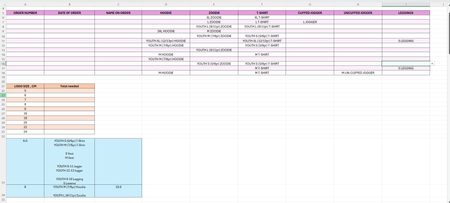

Thank you both for taking the time to respond.
It won't let me attach a copy of the spreadsheet but here is a link to it
https://1drv.ms/x/c/c35c074091694af2/IQD6efwQOYdiQKOITnxt4AyqAYWnf9GmFLCdyknPrHOBB4Y?e=sbX5Pv
I am a novice with excel so I have developed the spreadsheet the best I can with my current knowledge.
I didn't know how to set it up for if someone orders multiple of the same item so when that has happened I have just been entering it on the row below. If there is a better way then I am open to all suggestions.
The blue section was just an extract of the spreadsheet I have for the logo sizes (it has its own tab in the worksheet) but essentially if someone was to order a 'YOUTH M (7/8yr) Hoodie' then that requires a 6cm AND an 18cm logo (one for the front of the hoodie and one for the back). However a 'YOUTH M (7/8yr) T-shirt' only requires a 6cm logo for the front as it is not having a logo on the back.
The text for all the entries should be the same as I have created the spreadsheet with drop down lists so that I can just select the relevant items on each order. What is data validation?
I will have a look at possibly re-doing the spreadsheet, I just wanted something that clearly displayed what each person had ordered so it could be referred to when packaging orders.
Thank you for your help

Hi Sazzy,
Thank you for sharing the workbook. on the MTA ('26) tab I created a table with the logo sizes. I found a number of issues in the process. First off the table you had didn't have the right logo size options for MTA. Next i found in the tables on the 'logo sizes' tab you had entries like:
YOUTH XS (3/4yr) Hoodie & Zoodie
which means the "YOUTH XS (3/4yr) Zoodie" would not match that entry (as I mentioned the text for all entries need to be identical). I also found 2 other differences including Tee vs T-shirt and Strap Top vs Sprag Strap Top.
I made corrections on the MTA table but didn't touch the S.S table.
So the updated formula I use actually builds the logo sizes table with all the possible sizes based on the logo sizes tab and then does the counting. This is great but I found 1 problem. The number of orders was 20 but I found 21 logo sizes for the smaller sizes (i.e. not counting the larger back logos). I believe this is because
"L Spag strap top" will match with "XL Spag strap top" and both of those match with "XXL Spag strap top" and so on.
This is a problem with the configuration you have. Even if you have a more consistent comma deliminated list or always had each item on its own line and added an extra line on each cell we make the search explicitely look for a line feed immediately before the item text. but IMHO these are just 'hacks' to make it work. (btw I put everything on its own line and added the extra line return and added the preceeding line return to the search to make it work)
As for what I feel it a better way to set it all up:
I attached a file in a prior reply with a suggested different layout. It has the main data table and then a item table that can include the logo sizes there and finally a table to sum up the logo sizes. By adding the logo size lookup to the data table the sum becomes really easy to find.
That item table showing all the different items and sizes and logo sizes could be on a separate tab and have multiple columns for different customers and front and back. then the lookups would just pull from the corresponding columns.