Forum Discussion

Help with summing totals using multiple texts
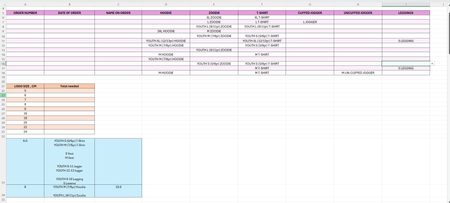

ok so this is NOT the best way to have the worksheet set up. For example what will happen if someone order 2x (or more) of something? or even if they want 2 different sizes of the same item.
next I don't understand the 'blue' section and how that defines the logo size. I see a number 6 on both rows and the second row has the number 18.
lastly i caution that those entries will all have to be exactly the same for the item & size in all lines (but this is true in most cases but in my proposed format it is a bit more 'simple') I highly recommend you use data validation if you aren't already.
so for you your set up, a formula that should work to sum up the number of cases you find any of the text in that list of items from the Table range (note I defined the data found on your image in A6:I18 as "Table1"):
=SUM(COUNTIF(C34,"*"&Table1&"*"))-COUNTIF(Table1,"")so although that may work for you I suggest re-doing the sheet something more like this:
so on the left is a data entry table where you have each line be 1 item (item type + size) with a quantity
in columns J:L is a table for all the items and sizes and corresponding Logo Sizes
I added column G to the data entry table for the logo size, but that is a lookup formula so you do not enter that cell, it is automatically calculated based on the table
Finally in O:P is a simple table to sum up the orders based on logo sizes
There are MANY ways to do this, and this is just one but I highly recommend you reconsider your original format.
I will try to attach this sample file with both your tables and my suggestion.
my sample file ... maybe