Forum Discussion

hasan ahmed
Jul 13, 2019Copper Contributor
Help with #NUM error in IRR formula
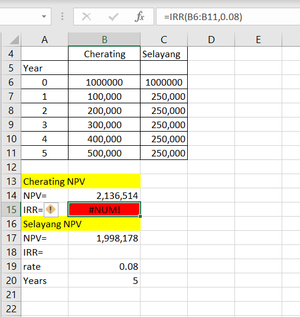
In the attached image and file (See tab B&C, Cell B15,) I'm having difficulties with the IRR formula as it is displaying a #NUM error instead of a numerical value. What seems to be the issue here? ...
- Jul 13, 2019
IRR requires at least one negative value (as initial cost of business), see at https://support.office.com/en-us/article/IRR-function-64925EAA-9988-495B-B290-3AD0C163C1BC


JoeUser2004
May 30, 2023Bronze Contributor
HansVogelaar wrote: ``As @Joe User has explained very patiently [....]``
Thanks. I tried to be.
HansVogelaar wrote: ``exceed the limit of what Excel's 64-bit floating point engine can handle``
I amended my explanation later. Such large values strain the limits of 64BFP precision.
Of course, 64BFP "can handle" much larger values, up to about 1.8E+308.

HansVogelaar
May 30, 2023MVP
OK, thanks for the correction.