Forum Discussion

Steven35-31
Sep 18, 2024Copper Contributor
Help with formula
Hello, I literally can not come up with the solution, and I have tried sum product or sum ifs, match 2 criteria`s to find the data belonging to it. Which formula should I be using? index&match ?...

BillY2305
Sep 18, 2024Tin Contributor
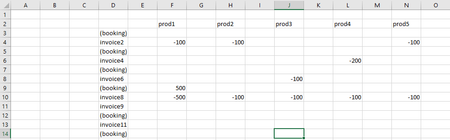
You can do this with an array formula. First, you never did use the -200 number (row invoice4, column prod4, in your summary table showing in Column V & Column W). Not really sure if that was intentional or accidental. All you need to do is add a row in Columns V & W that contains invoice4 prod4 and it will work.
The array formula is:
=SUM(IF(($D$3:$D$14=$V5)*($F$2:$N$2=W5),$F$3:$N$14))
IMPORTANT: you must hit CTRL-SHIFT-ENTER at the end of entering that equation (not a regular enter). That will put { } brackets around your equation. You do not type those brackets manually.
The logic behind this is we want to search through $D$3:$D$14 (the column of invoice names) and whatever matches the invoice in your Column V, and also search through row $F$2:$N$2 (the row of prod1, prod 2, etc.), and whatever matches the prod in your column W, add the corresponding cell within the range $F$3:$N$14.
After you do the CTRL-SHIFT-ENTER, then copy that cell, and paste it in your Column X, but begin at the 2nd row (invoice2 prod2) down to (invoice8 prod5).
The array formula is:
=SUM(IF(($D$3:$D$14=$V5)*($F$2:$N$2=W5),$F$3:$N$14))
IMPORTANT: you must hit CTRL-SHIFT-ENTER at the end of entering that equation (not a regular enter). That will put { } brackets around your equation. You do not type those brackets manually.
The logic behind this is we want to search through $D$3:$D$14 (the column of invoice names) and whatever matches the invoice in your Column V, and also search through row $F$2:$N$2 (the row of prod1, prod 2, etc.), and whatever matches the prod in your column W, add the corresponding cell within the range $F$3:$N$14.
After you do the CTRL-SHIFT-ENTER, then copy that cell, and paste it in your Column X, but begin at the 2nd row (invoice2 prod2) down to (invoice8 prod5).

Steven35-31
Sep 18, 2024Copper Contributor
thank you, I didn't think of that!