Forum Discussion

Help with Excel EXP formula with Vlookup and IF function spitting #N/A
 Jun 11, 2021
Riny_van_Eekelen wrote: ``change the formula to
=VLOOKUP($C8,'Input market data IR (2)'!$B$6:$L$60,9,0)
Start the lookup range in column B and decrease the column count by 1``I agree with Riny insofar as changing the lookup column to B instead of A.
But the additional adjustment to the formula in G8 is more than merely decreasing the column offset by 1.
I think it would be easier to understand and maintain if you change the formulas to use an INDEX/MATCH paradigm. Specifically:
E8:
=INDEX('Input market data IR (2)'!$J$6:$J$60,
MATCH($C8,'Input market data IR (2)'!$B$6:$B$60,0))F8:
=INDEX('Input market data IR (2)'!$K$6:$K$60,
MATCH($C8,'Input market data IR (2)'!$B$6:$B$60,0))G8:
=IF($A8<$C$5,0,EXP(-$B8*(E8+($B8
-INDEX('Input market data IR (2)'!$I$6:$I$60,
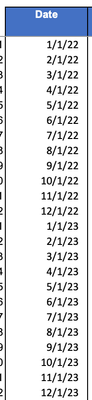
MATCH($C8,'Input market data IR (2)'!$B$6:$B$60,0)))*F8)))But note that you still get #N/A errors in row 82 because C82 is 12/31/2023 instead of 12/1/2023.
You might fix C82.
But I wonder if you really want MATCH(...,...,1) instead of MATCH(...,...,0).
The change presumes that the dates in B6:B60 are in ascending order. That is true for the Excel file that you posted. Only you can say whether we can depend on that.

Riny_van_Eekelen wrote: ``change the formula to
=VLOOKUP($C8,'Input market data IR (2)'!$B$6:$L$60,9,0)
Start the lookup range in column B and decrease the column count by 1``
I agree with Riny insofar as changing the lookup column to B instead of A.
But the additional adjustment to the formula in G8 is more than merely decreasing the column offset by 1.
I think it would be easier to understand and maintain if you change the formulas to use an INDEX/MATCH paradigm. Specifically:
E8:
=INDEX('Input market data IR (2)'!$J$6:$J$60,
MATCH($C8,'Input market data IR (2)'!$B$6:$B$60,0))
F8:
=INDEX('Input market data IR (2)'!$K$6:$K$60,
MATCH($C8,'Input market data IR (2)'!$B$6:$B$60,0))
G8:
=IF($A8<$C$5,0,EXP(-$B8*(E8+($B8
-INDEX('Input market data IR (2)'!$I$6:$I$60,
MATCH($C8,'Input market data IR (2)'!$B$6:$B$60,0)))*F8)))
But note that you still get #N/A errors in row 82 because C82 is 12/31/2023 instead of 12/1/2023.
You might fix C82.
But I wonder if you really want MATCH(...,...,1) instead of MATCH(...,...,0).
The change presumes that the dates in B6:B60 are in ascending order. That is true for the Excel file that you posted. Only you can say whether we can depend on that.
- CocoZhouJun 11, 2021Copper Contributorthank you so much, this was very helpful!