Forum Discussion

James818
Aug 08, 2023Brass Contributor
Help with a interactive chart
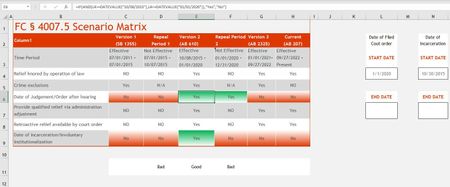
Hello everyone. I am creating a excel chart for work in the legal field. With constant changes to certain laws, we have a time period to keep in mind if a legal procedure is warranted based on 2 dat...

James818
Aug 08, 2023Brass Contributor
Got one working,
=IF(AND(C6="Yes",C9="Yes"),"Good","Bad")
=IF(AND(C6="Yes",C9="Yes"),"Good","Bad")

mathetes
Aug 08, 2023Gold Contributor
Got one working,
=IF(AND(C6="Yes",C9="Yes"),"Good","Bad")
Yes. That's the formula (with relative references changed for different columns) that goes in Row 11.
Then this pair of conditional formatting rules sets the cell in Row 11 to Green or Red as needed. See attached.