Forum Discussion

Help with a interactive chart
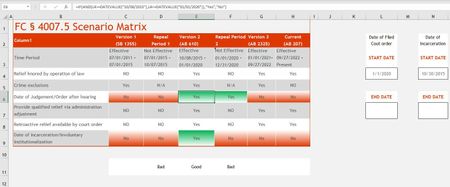

At the very simplest level, this turns the cell in row 11 green or red depending on what's in the two cells above that you specifically mentioned. However, what you wrote is a bit confusing:
If any 2 green cells line up in a row (ed. column?) as an example Column E, I would hope to have row 11 light up as good or bad depending on if the above matches green or not.
Making a cell dependent on 2 cells being green or YES will save up time knowing this is a good time frame for specific process in this legal issue.
But in Column E every cell is "Yes". Do you mean "any 2" of all of those or only the two that are, in fact, highlighted in Green?
Conditional formatting is most likely what you need. My example does it, but as noted, only at the simplest level. If your conditions are more nuanced, please:
- describe them more fully
- attach an actual sample workbook or post it on OneDrive or GoogleDrive, with a link here that grants access. A picture is worth a thousand words, supposedly, but an actual workbook is easier to work with.
 James818Aug 08, 2023Brass Contributor
Row 11 cells would be good/green only when the 2 cells above (Rows 6 & 9) of that specific column are both green/Yes only.
I attached a screen shot in theory how I would hope it to look.
I am having issues uploading a file copy, I may need to wait until I get home.
- James818Aug 08, 2023Brass ContributorGot one working,
=IF(AND(C6="Yes",C9="Yes"),"Good","Bad")- mathetesAug 08, 2023Gold Contributor
Got one working,
=IF(AND(C6="Yes",C9="Yes"),"Good","Bad")Yes. That's the formula (with relative references changed for different columns) that goes in Row 11.
Then this pair of conditional formatting rules sets the cell in Row 11 to Green or Red as needed. See attached.