Forum Discussion

Ccrossed
Aug 26, 2021Copper Contributor
Help with a big formula using and, xlookup, if and sumifs
Hello all! I'm working on a report (per company policy can't share) on which I would like to optimize with formulas. I made a dummy example as close as I could so I could explain myself better for...
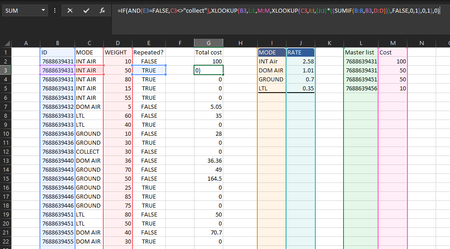
- Aug 26, 2021
If I understood the logic correctly that could be
=LET(
  getSum, IF( ISNA( XMATCH([@ID],MasterList[Master list]) ),
          XLOOKUP([@MODE],
                   Rates[MODE],
                   Rates[RATE]*SUMIF([ID],[@ID],[WEIGHT]),
                   FALSE,0,1),
          SUM( FILTER( MasterList[Cost], MasterList[Master list] = [@ID]) )
       ),
 adjustedSum, IFS( [@MODE] = "Ground", MAX( 5.28, getSum),
                   [@MODE] = "LTL", MAX( 86.11, getSum),
                   TRUE, getSum),
 IF( AND( [@[Repeated?]]=FALSE,
          [@MODE]<>"collect"),
     adjustedSum,
     0)
)

Ccrossed
Aug 27, 2021Copper Contributor
Thanks for your reply, I know how complex this worksheet is so I'm more than glad to clarify anything possible. The master list contains a record of IDs and their cost, these can be repeated and I'm trying to get a total cost for said ID, however if any ID is not found on the master list then it should be manually calculated by multiplying a base rate (J:J) by the weight of said ID (if there are multiple matching IDs it's ok we would just have to add the total weight before getting that specific ID's total cost) However!: If and ID has "collect" on C:C and TRUE on E:E then it shall be ignored and given a 0 on total cost. Let me know if that helps!

SergeiBaklan
Aug 27, 2021Diamond Contributor
It looks like suggested LET() formula shall work.