Forum Discussion

Help with a big formula using and, xlookup, if and sumifs
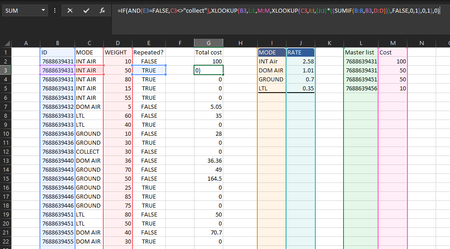
- Aug 26, 2021
If I understood the logic correctly that could be
=LET(
  getSum, IF( ISNA( XMATCH([@ID],MasterList[Master list]) ),
          XLOOKUP([@MODE],
                   Rates[MODE],
                   Rates[RATE]*SUMIF([ID],[@ID],[WEIGHT]),
                   FALSE,0,1),
          SUM( FILTER( MasterList[Cost], MasterList[Master list] = [@ID]) )
       ),
 adjustedSum, IFS( [@MODE] = "Ground", MAX( 5.28, getSum),
                   [@MODE] = "LTL", MAX( 86.11, getSum),
                   TRUE, getSum),
 IF( AND( [@[Repeated?]]=FALSE,
          [@MODE]<>"collect"),
     adjustedSum,
     0)
)


I'm not able to follow your explanation as to what you're trying to calculate. So let me send this back to you to suggest another function that might be helpful; feel free, though, to come back with clarification.
I entered this formula in cell O2: =SORT(UNIQUE(B2:C22))
to get this array of unique IDs and associated modes (UNIQUE does require the most current version of Excel, so if it doesn't work, let us know)
Beyond that, though, it's not clear to me what the relationship is between all your tables and what you're trying to calculate. I think my UNIQUE list has eliminated the need to look for FALSE in your IF function...but, as I said, it's not clear to me. I'd like to make it a more elegant solution if possible, as I'm sure you would too.
- CcrossedAug 27, 2021Copper ContributorThanks for your reply, I know how complex this worksheet is so I'm more than glad to clarify anything possible. The master list contains a record of IDs and their cost, these can be repeated and I'm trying to get a total cost for said ID, however if any ID is not found on the master list then it should be manually calculated by multiplying a base rate (J:J) by the weight of said ID (if there are multiple matching IDs it's ok we would just have to add the total weight before getting that specific ID's total cost) However!: If and ID has "collect" on C:C and TRUE on E:E then it shall be ignored and given a 0 on total cost. Let me know if that helps!
- Detlef_LewinAug 27, 2021Silver Contributor
***
Ccrossed wrote:
The master list contains a record of IDs and their cost, these can be repeated and I'm trying to get a total cost for said IDA master list should contain unique IDs and no duplicates.
Why don't you change the two entries from 100+50 to one entry with 150?
- SergeiBaklanAug 28, 2021Diamond Contributor
Detlef_Lewin , I don't know what is the logic behind, but it's possible to do the calculation with duplicates. Not as easy as with unique ID:s, but it works.
- mathetesAug 27, 2021Gold Contributor
Apparently SergeiBaklan understands the spreadsheet and your intent. If his formula works for you, I'm happy to step out of the picture.
I still don't get it. Let me, as best I can, give the source of my confusion.
I do understand that the purpose is ultimately to figure out costs to be attributed to each account.
BUT
- master list contains a record of IDs and their cost :
- cost of what?
- does that mean nothing further needs to be done with them? (pretty clearly not, but that doesn't help)
- and if they're repeated, as they are, what does that mean?
And maybe this is just my obsessive compulsive nature, but you are so close to it I think you take for granted the context. It's the "big picture" that's not clear. I have no idea what all this represents, and for me at any rate, knowing what that big picture is helps me navigate the details.
- master list contains a record of IDs and their cost :
- SergeiBaklanAug 27, 2021Diamond Contributor
It looks like suggested LET() formula shall work.
