Forum Discussion

toriana
Sep 10, 2019Copper Contributor
Help w/ "Remove Duplicates" function on the "Data" tab
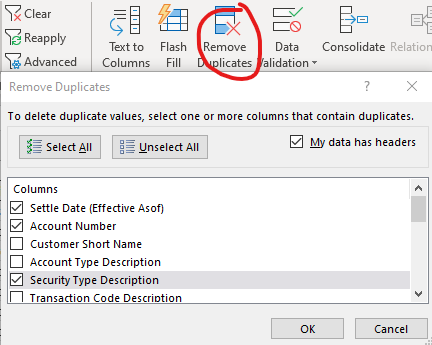
I am working with a large data set (12 columns with 45,000 rows of entries) which is updated each day which in turn auto-updates a dashboard (within the document on another sheet) I have created to a...

JKPieterse
Sep 11, 2019Silver Contributor
You could use the Data, From Table button to remove the duplicates. Just control+click the three columns , click the Remove Rows drop-down and then select "Remove Duplicates". AFter that click the "Close & Load..." drop-down and choose "Close & Load to..." and set it to return a table on a new worksheet. Now make sure your dashboard formulas use this new table instead of the original.

toriana
Sep 11, 2019Copper Contributor
JKPieterse ok great! I will give this a try. And this should be applied automatically to any additional data entered into the table? I really appreciate the response!