Forum Discussion

HELP!! Stuck on INDEX/MATCH/IF Formula for Days!
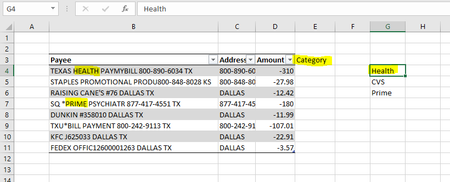

Sorry for some reason the picture isn't being uploaded.
here is a link for image reference: https://imgur.com/a/gvXe1K7

=IF(OR(ISNUMBER(SEARCH($G$4:$G$6,B4))),"Medical",IF(OR(ISNUMBER(SEARCH($H$4:$H$6,B4))),"Food","Other"))
I think this is because the second OR is missing in the formula. In the above formula i've added the part highlighted in red and it works in my sheet.
- BurhanMLDec 09, 2022Tin ContributorCan you explain to me why we have an OR formula in this? I feel like I'm failing to understand where we apply the logical statement here. Also, tell me if I understand this correctly: SEARCH is able to partially match KFC, dunkin, raising even though the Payee description doesn't exactly match the keywords?
- OliverScheurichDec 09, 2022Gold Contributor
In order to see what the OR(ISNUMBER(SEARCH( formula does you can select the ISNUMBER(SEARCH( formula as shown in the screenshot.
Then click the F9 button to view the evaluations of the formula. In the example the results are FALSE, FALSE, TRUE (FALSCH; FALSCH; WAHR in german Excel). The result means that "raising" and "dunkin" don't appear in cell B10 "KFC payment" but "KFC" does appear. The result is FALSE, FALSE, TRUE (in this order) because "raising", "dunkin" and "KFC" are in cells H4:H6.
The OR function checks if any of the results from the ISNUMBER(SEARCH( function is TRUE.
In order to escape this view you can either press ctrl+Z or click the highlighted red sign on the left.
In order to see what the SEARCH formula returns you can select SEARCH(H4:H6;B10) in the formula bar and click F9. You can do this in the same way as with the ISNUMBER(SEARCH( formula.
- BurhanMLDec 10, 2022Tin Contributor
Dear Quadruple_Pawn,
I have one final question. Please see attached picture as reference: https://imgur.com/a/7dcbZGK
As you can see, I have moments where my Amazon (and other categories also) have some transactions that have refunded back to my card. I tried adding another (IF(OR(ISNUMBER(SEARCH( formula where I made the logical statement > 0 and if it was true, it would return a "Refunds" text string.
But my formula is not working. How do I incorporate the fact that some transactions are expenses and some are refunds from the same vendor, but I want it to be in two different categories so that it doesn't sum up and give me a different net result!