Forum Discussion

Help Needed - Trend Line to Start on a Specific Year
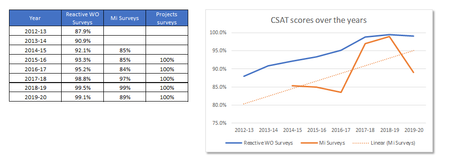

Hello,
Here is the workaround I found:
there is an option to show the formula used to calculate the trend line. In your example it is
y = 0,0211x + 0,782. So basically X is the row number starting from the 3rd cell. So I created a new series with formula on cell F5:
=0,0211(ROWS($B$2:$B5)+0,782
and coppied the formula below till F10 and added this to the graphic as a new series. As the values on cell F3-F4 are 0, basically this new series is which is overlapping with your trendline starts at 2014-15.
However you need to update the formula used in calculation whenever you add new data to the series. You can enter two constants used in the formula to two cells and use cell references to automatically calculate the values whenever you change them. Ofcource copied from the trendline formula generated by Excel.

- erol sinan zorluMay 20, 2020Iron Contributor
here you go.