Forum Discussion

HELP! Formula or Conditional Formatting?
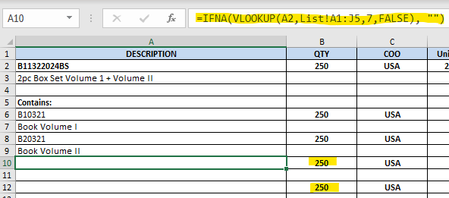

Use only one of the following options:
Option 1: A formula. (Edited to correct mistakes)
Select B10 and enter the formula
=IF(A10="", "", B2)
Select B12 and enter the formula
=IF(A12="", "", B2)
Option 2: conditional formatting.
On the Home tab of the ribbon, click Conditional Formatting > New Rule...
Select 'Use a formula to determine which cells to format'.
Enter the formula
=A10=""
Click Format...
Activate the Number tab.
Select Custom in the Category list.
Enter ;;; (three consecutive semicolons) in the Type box.
This will hide the contents of the cell.
Click OK, then click OK again.
On the Home tab of the ribbon, in the Clipboard group, click the Format Painter.
Then click on B12 to copy the conditional formatting rule.

Thank you anyway!!
- HansVogelaarJun 30, 2024MVP
Sorry, my mistake. Option 1 should have been
Select B10 and enter the formula
=IF(A10="", "", B2)
Select B12 and enter the formula
=IF(A12="", "", B2)