Forum Discussion

Help Creating Conditional Formula

Thank you so much!
The only other question I had was that some of the D cells aren't looking like I need them to. I have the rules ordered and input as shown, so I'm confused, haha.

I'm not sure exactly what you're seeing that's not as you want (I'm not patient enough to go through each line on my own, when you could just tell me and others going through this thread).
I will say that I've always found Conditional Formatting to be very much a matter of trial and error, especially in the early learning stages. I can see that you've made some changes to the rules (which is fien).
What I notice, and perhaps this is the source of the "not working": your formula as it applies to the "Cat" species is specifying the wrong columns (I've copied YOUR image below)
You've written : =AND(C7="Cat",F7>=35) but those cell references should be the same as the ones for "Dog" other than specifying the different species and different number.
So it should read =AND(A2="Cat",D2>=35)
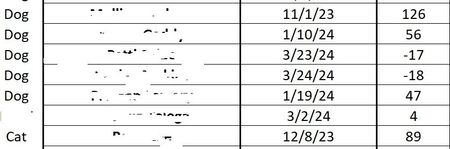
- JessietmMar 06, 2024Copper ContributorAh! I fixed the typo, but the first entry and the third from the bottom in the second image are still not conforming to those rules. Both are dogs with values over 21.
I ended up just using the one you sent and manually re-entered everything. My sheet was in the form of a table and I wonder if that was part of the issue.- mathetesMar 06, 2024Gold Contributor
Ah! I fixed the typo, but the first entry and the third from the bottom in the second image are still not conforming to those rules. Both are dogs with values over 21.
I can't see your actual rules in those rows. My guess is that somehow they're different.
OR, another possibility, depending on how you enter the word "Dog" in column A is that you might have entered "Dog " or some such. Excel is very literal. Blank spaces don't confuse you and me, but they do not look the same to Excel.
If you're not using Data Validation to enter the Dog or Cat value in column A, I highly recommend implementing that.
If you remain stymied, may I suggest that you remove the actual names of the owners and post a copy of the actual spreadsheet without those names. I'll take a look at it and see if I can diagnose and treat. I could then just send you the prescription. (Sorry; couldn't resist.)